
My First Exchange 2007 Installation on Windows 2003 SP2 64 Bits.
It was back in March 2010, where I wanted to start learning Microsoft Exchange 2007. As matter of fact the newer version was already in market i.e. Microsoft Exchange 2010. But I made a point that I should learn a bit of Exchange 2007 before poking my nose into Exchange 2010, it will be benificial for my learning. So I made a point that I will try to learn as much as I can till this year gets complete. So I here I am posting the first installation I did when I was learning Exchange 2007.
The way I learned Exchange 2007 was a bit different then usually way of learning. Like what are prerequisites of Exchange 2007 for Win2k3 or say Win2k8 like what services you need up and running. Which version of .Net framework is required, are there any updates needed to be installed on prior deployment etc. Usually we think we should Google the article read it & then try installation of the same.
Here what I did is prepared my test environment on VM Ware, downloaded Exchange 2007 SP1 Enterprise Version’s setup from torrent and that’s all. Just navigated to setup.exe and started the setup. As I wanted to face as much error I can possibly go through so that I can learn more. I didn’t updated my server with any of the .Net framework or additional services like IIS or SNMP, SMTP. I didn’t give any permissions like Domain, Enterprise or Schema Admin. I knew that I need all of them actually but I wanted to go across the errors which I’ll see if I won’t do anything.
Once I click on setup I started getting errors and warnings. Which I must say were quite informative, all you need is start making points that these all are the action required prior to install Exchange 2007. Setup will also let you know which permission you exactly need at which point of time.
So after I went through all warnings, errors and recommended settings. I completed my setup of Exchange 2007 on Windows 2003 SP2 on 64 Bit in test environment.
Let’s move ahead and start the setup of our Exchange 2007 Server.
I Installed VMWare workstation on a Hardware with 1GB Ram, on which windows 2003 Sp2 is installed. Configured IP with proper DNS settings as required by Exchange server. As I was doing this in test environment on my Laptop I just ignored the fact of not installing Exchange server & your DC on same hardware, in production environment you barelly want this kind of setup. But in test environment its fine.
So lets configure IP's i.e. Defailt gateway & DNS of our DC, on which we are going to install DNS while running DCPROMO.

Now run DCPROMO from the Command line to install Active Directory and Raise the Domain Functional Level atleast to “Windows 2000 Native” mode.
Steps to configure your Domain Controler in Brief:
Select as First Domain/Forest in the organization. Once we have our DC in place.
Enter Restore password.
Configure DNS.
Reboot your System.
Note- Local Users will be overwritten by directory services. So make sure you have a encrypted password setup for your local administrator.
Lets start looking toward prerequisites for Exchange 2007. Well as I mentioned we will learn while we setup our exchange server about all prerequisites.Now most important thing is right permissions to install exchange server.
User should be a Member Of Local Admin, Domain Admin, Enterprise Admin as well as Exchange Organization Admin. If you are expanding the schema of your forest or domain then Schema Admin permissions are also required. If you just start your setup without taking care of these permissions, wizard will let you know what permissions you need to take care of. Here I have assigned disered permissions.
Now next thing is:
Install 2.0 .Net framework SP1
MMC console 3.0 Version
IIS for CAS server role.
Audio Video update for Unified Messaging Server.
I would suggest you not to worry about prerequisites, if you are leaning in test environment.
Just hit the setup to face errors and then try to resolve them one by one, its worth of an experience. For example I did something like that & these were few error I got while installation. Same kind of errors with description you will get if you dont have appropiate permissions or prerequisites inplace.

So now lets start with some commands to prepare our environment for Exchange 2007 server.
Here are the commands you need to run fromk Exchange setup directory.

Once you are done with these commands successfully. You need to run setup from Exchange folder.

Just read if you are installing Exchange server for the first time else, jst knock it off ;) click Next.

Accept the license to move forward with installation.

Error report is a good feature from Microsoft if you have a valid copy in production server it may help you with issues and recomendations.As of now, no need to enable Error reporting in Lab environment.

Select your server roles which you have decided to go on with, here we are going to install typical installation as we are installing Exchange server on single hardware.
If you are planning to install Exchange server 2007 on a cluster environment then you need to have mailbox server role on different hardware, then you need hardware for CAS, HUB Transport & UMessaging (which you can install on single hardware too, then last but not least Edge server which will not be a part of your active domain, will be outside of your firewall, instead. Edge server uses its own active directory services to deliever the required roles and responsibilities.

Select roles you want to install for your environment, minimum you need Mailbox, CAS & HUB transport to have your Mail flow for your organisation.

This option will allow legacy clients to still able to connect exchange 2007 servers. This option do the settings and configure exchange environment with legacy client connectivity. I am not sure if you miss this option you can enable it or not, but I assume there must be some work around available.

Click next to start the installation of exchange server which can take approximate 30 mins to complete depanding on the organization setup.

Click Finish, to complete the installation of exchange server, which will start the updates for your server. Once your server is up to date, please reboot it once before you put it in production environment.
 On introduction screen lets give a relevant name for the New Send Connector.
 Lets decide the address space of domain you want to use this send connector or we can also use a single send connector for every outgoing emails. Here, by creating multiple send connectors and managing the traffic by assigning cost to them, will also help in balancing the load on HUB Transport server for better performance of mail flow.
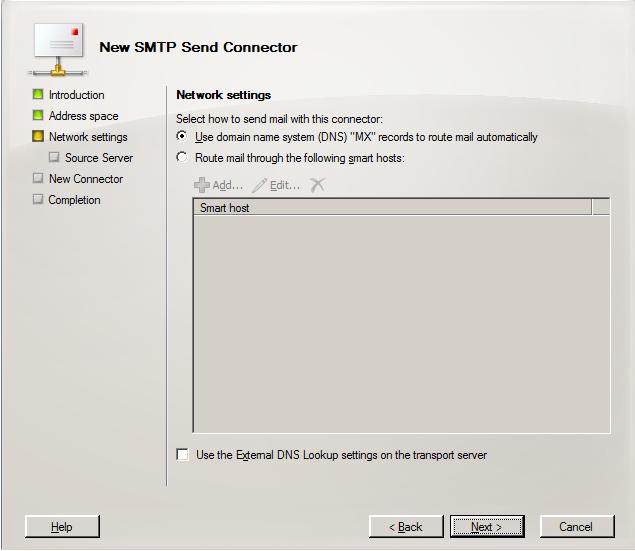
 On the next screen we can select network settings to Route Mails or a Smart Host implemented for routing emails. If we dont have any Smart host or SMTP relay server or say EDGE server we can just go ahead with default option i.e. DNS which will route every emails automatically for you.
 Select and Add our Exchange HUB server.
 Review the summary, if everything look ok, click New to create New Send Connector.
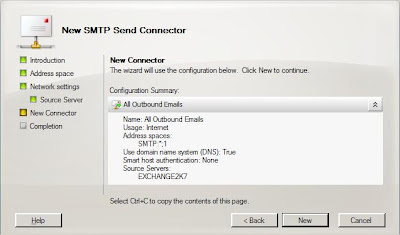 So we just created our New Send Connector for our Mail server. Click Finish to complete the wizard.
 In Exchange 2007 environment, we need not have to create New Recieving connector to receive emails. By default we can recieve emails once send connector is in place in our organization.
But still if we want to manage our mailflow uniformly we can create New Recieve Connector on Hub Server under Organization Configuration.

Creating Send Connector for Mail Flow
Unlike exchange 2003 we must create send connector to send emails, Internally or externally. As by designed every email is processed by HUB server even if recipient is from same exchange server or say database.
So in order to have a successful Mailflow lets craete Send Connector.
Open Exchange Management Console and select HUB Transport under Organization configuration. Click on New Send Connector, which will open a wizard for it.

I must say Name has nothing to do with nature of work, it depends on what criteria you fix it.




But still if we want to manage our mailflow uniformly we can create New Recieve Connector on Hub Server under Organization Configuration.


